firefox-sync documentation
Self-host Firefox Sync with Docker, Podman or Kubernetes: your bookmarks, passwords, history and tabs stay on your own server instead of Mozilla's, and optionally the Mozilla accounts too. The images are built from Mozilla's code with as few changes as possible, see why these images.
This is the index of every page. New here: read What you need, then follow Choose your path.
What you need
- A server that runs containers: Docker with the compose plugin, Podman, or a Kubernetes cluster.
- A host name with HTTPS for the Sync server, for example
sync.example.com, behind your reverse proxy (the setup writes its configuration, or runs a bundled Caddy) or an Ingress. See Reverse proxy. - A database. By default the stack runs its own MariaDB containers. It can run MySQL or PostgreSQL instead, or use a server you already run: see Databases.
- For self-hosted accounts only: more host names, more memory and an SMTP server. See their requirements.
Each install page lists what its platform needs on top of this.
Choose your path
-
Install the stack, one of:
- Docker compose
- Podman: Quadlets, or docker compose on the Podman socket
- Kubernetes with Helm
-
Point your reverse proxy to it, with the configuration the setup wrote into
proxy/, or let the bundled Caddy do it. - Decide who can use your server.
- Set up Firefox on every device.
- Turn on the backups.
Optional, at any time: self-hosted accounts, the admin UI, your own database server.
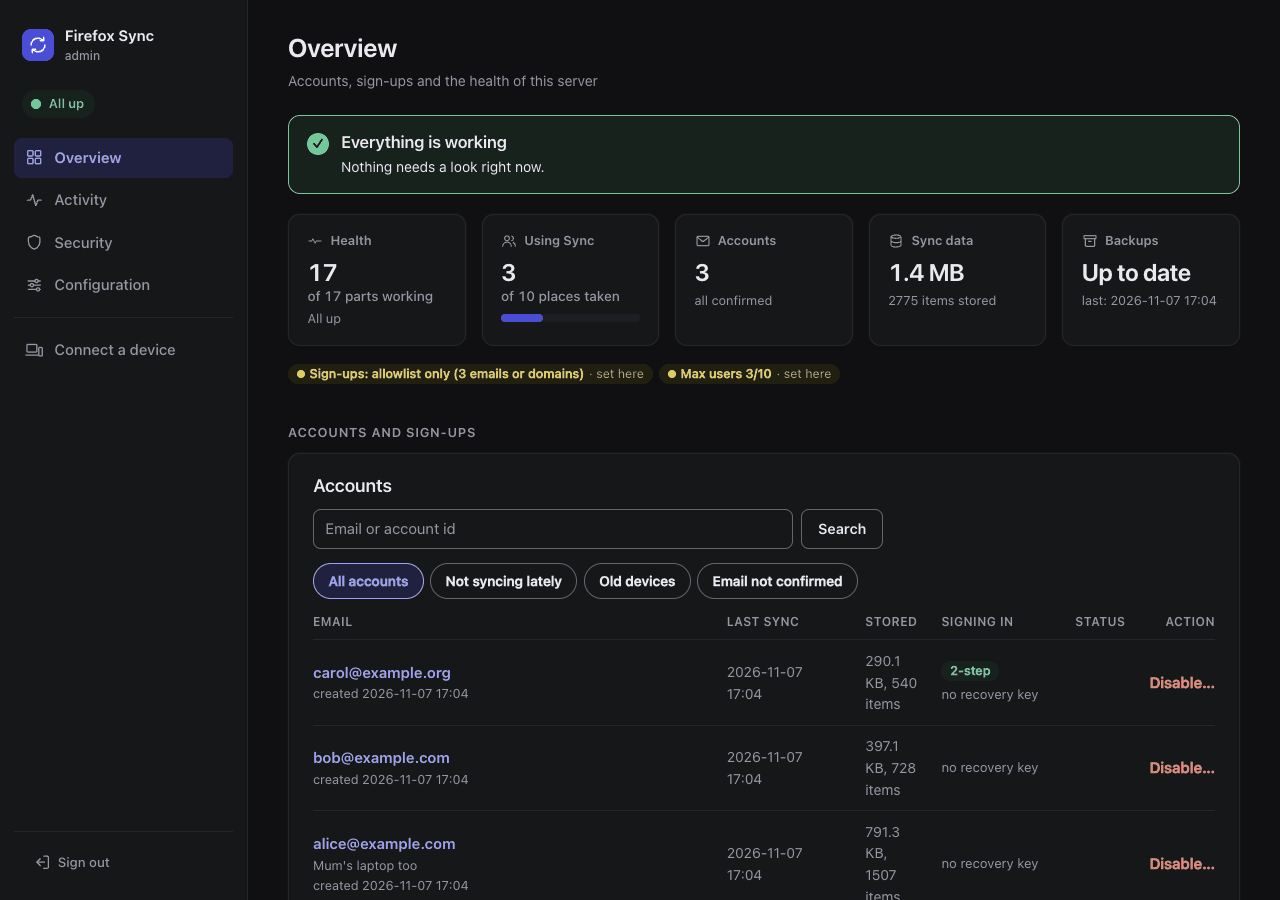
The admin UI: accounts, storage, health, setup checks and alerts.
Every page
Setting up:
- install/compose.md: docker compose
- install/podman.md: rootless Podman, with Quadlets or docker compose on the Podman socket
- install/helm.md: Kubernetes with the Helm chart
- reverse-proxy.md: host names and ports, request size, the sign-up gate, pairing, the client IP address, publishing the admin UI
- access-control.md: access control, which setting decides who can sync, reach the server and run it
- limits.md: who can use your server,
SYNC_MAX_USERS, invite-only Sync (SYNC_ALLOWED_ACCOUNTS) andFXA_MAX_ACCOUNTS - single-sign-on.md: single sign-on (Authelia) and client certificates in front of the accounts pages and the admin UI, and why not the other hosts
- firefox.md: Firefox on desktop, Android and iOS, with Mozilla's accounts or yours
- accounts.md: self-hosted Mozilla accounts, and their telemetry, all off
- databases.md: choosing a backend, the supported versions, your own database server
Running it:
- backups.md: what to keep, the backup service, copying off, restoring
- upgrading.md: new images, the earlier firefox-sync release (and Watchtower on its images), renamed settings, database majors. What changed in each release: CHANGELOG.md
- migrating.md: from another Sync server, or from docker compose to Kubernetes
- troubleshooting.md: symptoms and fixes, by area
The admin UI:
- admin/README.md: what it does, setting it up, reaching it
- admin/signing-in.md: password, OpenID Connect, a trusted header
- admin/accounts.md: finding, inviting, disabling and deleting accounts
- admin/monitoring.md: health, checks, metrics, the event log, Prometheus
- admin/alerts.md: email and the other destinations
- admin/storage.md: the storage report, purging, maintenance
Reference:
- reference/settings.md: every setting, its Helm value and its default
- reference/images.md: the images, their tags and the upstream patches
- reference/database-users.md: the database users and their grants
For contributors:
- development/testing.md: the tests and how to run them
- development/upstream-patches.md: applying upstream pull requests before their release
- development/releasing.md: the releases and CHANGELOG.md, publishing the images and the chart
- development/dependencies.md: Dependabot's updates, which are merged without a human, main's CI after them
Getting help
Search or open an issue. Give your install method, your database backend, the versions you run and the logs, with the secrets removed.